Overview
7.1.1 Maintenance
replication-manager embeds a cluster scheduler that automates database maintenance tasks: backups, log collection, table optimization, rolling restarts, and more. The scheduler is disabled by default — each task is individually enabled and given its own cron expression.
7.1.2 How the Job System Works
Maintenance tasks are coordinated through a message queue table that replication-manager creates and manages on every monitored database server. The flow is:
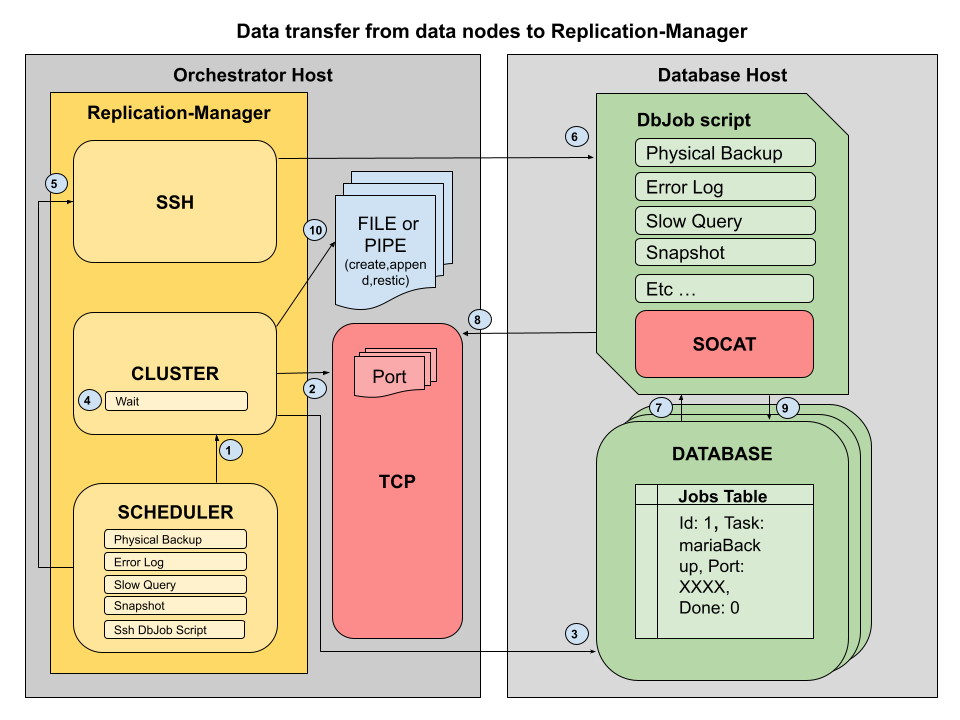
- Scheduler fires — the Robfig cron scheduler triggers a task at the configured interval
- Job is enqueued — replication-manager opens a TCP connection to the database server and inserts a row into
replication_manager_schema.jobs. All writes to this table usesql_log_bin=0so they do not produce binlog events - A port is reserved — replication-manager picks a free port from
scheduler-db-servers-sender-portsto receive the streamed result. It passes this address and port in the job row - The dbjobs script runs — a shell script on the database host reads the job table, picks up the pending task, marks it
processing, executes the work, and streams the output back to replication-manager viasocat - Result is received — replication-manager accepts the stream on the reserved TCP port and writes it to the appropriate destination (log file, backup directory, etc.)
- Job is closed — the script writes the result into the
resultfield and setsdone=1; replication-manager confirms completion on the next check
7.1.2.1 Jobs Table
CREATE TABLE replication_manager_schema.jobs (
  id      INT          NOT NULL AUTO_INCREMENT PRIMARY KEY,
  task    VARCHAR(20),
  port    INT,
  server  VARCHAR(255),
  done    TINYINT      NOT NULL DEFAULT 0,
  state   TINYINT      NOT NULL DEFAULT 0,
  result  MEDIUMTEXT,
  payload MEDIUMTEXT,
  start   DATETIME,
  end     DATETIME,
  KEY idx1 (task, done),
  KEY idx2 (result(1), task),
  KEY idx3 (task, state),
  UNIQUE  (task)
) ENGINE=InnoDB;
The state column tracks the task lifecycle:
0— available (pending)1— processing3— finished recently (post-job check)5— halted (replication-manager restarted mid-task; aborted for safety)
7.1.3 Scheduled Tasks
| Task | Config key | Description |
|---|---|---|
| Logical backup | scheduler-db-servers-logical-backup |
mydumper or mysqldump full backup |
| Physical backup | scheduler-db-servers-physical-backup |
mariabackup or xtrabackup xbstream |
| Log collection | scheduler-db-servers-logs |
Fetch error log and slow query log from each server |
| Log table rotate | scheduler-db-servers-logs-table-rotate |
Rotate mysql.general_log / slow_log tables |
| Optimize | scheduler-db-servers-optimize |
OPTIMIZE TABLE on all schemas |
| Analyze | scheduler-db-servers-analyze |
ANALYZE TABLE on all schemas |
| Rolling restart | scheduler-rolling-restart |
Restart replicas then primary one at a time |
| Rolling reprov | scheduler-rolling-reprov |
Re-provision services on a rolling basis (pro) |
| SSH job runner | scheduler-jobs-ssh |
Trigger the dbjobs script via SSH (osc) |
7.1.3.1 Logical vs Remote Execution
Not all jobs run the same way. Some are executed logically by replication-manager itself (via SQL connections or local binaries on the repman host), while others require a remote script (dbjobs_new) running on the database host because they need local filesystem access.
| Task | Execution | How | Why |
|---|---|---|---|
| Logical backup (mysqldump/mydumper) | Logical | repman executes the dump binary locally, connects to DB over TCP | SQL-based dump, no filesystem access needed |
| Physical backup (mariabackup/xtrabackup) | Remote | dbjobs script runs backup tool on DB host, streams via socat | Requires local access to InnoDB data files |
| Physical restore (reseed) | Remote | dbjobs script receives stream, unpacks and prepares backup locally | Requires local access to data directory |
| Optimize | Remote | dbjobs script runs mysqlcheck -o on DB host |
Batched via local client binary with --skip-write-binlog |
| Analyze | Logical | repman sends ANALYZE TABLE SQL via connection |
Pure SQL command, no local access needed |
| Log collection (errorlog/slowquery/auditlog) | Remote | dbjobs script reads log files and sends via TCP or API | Log files are local to the DB host |
| Log table rotate | Logical | repman sends TRUNCATE TABLE SQL on master |
Pure SQL command |
| Rolling restart | Remote | dbjobs script runs systemctl restart on DB host |
Requires OS-level daemon control |
| Rolling reprovision | Logical | repman coordinates re-provisioning via orchestrator | Orchestration-level operation |
| Schema monitoring | Logical | repman queries information_schema.TABLES |
Pure SQL reads |
| Checksum | Logical | repman sends CHECKSUM TABLE SQL via connection |
Pure SQL command |
Rule of thumb: if the task needs access to the database host's filesystem (data files, log files) or system services (systemctl), it runs remotely via the dbjobs script. If it only needs a SQL connection, it runs logically from replication-manager.
Each task has a matching -cron key for its schedule, e.g.:
monitoring-scheduler                      = true
scheduler-db-servers-logical-backup       = true
scheduler-db-servers-logical-backup-cron  = "0 0 1 * * *"   # 01:00 every day

scheduler-db-servers-logs                 = true
scheduler-db-servers-logs-cron            = "0 0 */6 * * *"  # every 6 hours

scheduler-db-servers-optimize             = true
scheduler-db-servers-optimize-cron        = "0 0 3 * * 0"    # Sundays at 03:00
7.1.3.2 Rolling Operations: restart vs upgrade vs reprovision
replication-manager offers three rolling actions that walk the cluster one node at a time (replicas first, then a switchover for the primary) so the cluster stays available. They differ in whether they regenerate and re-push the orchestrator service definition — which is what actually applies a configuration change such as a new my.cnf, an added volume mount, or a new container image — and in how disruptive they are:
| Action | API action · scheduler key | What it does to the service | Refreshes the service config? | Data | Use it to |
|---|---|---|---|---|---|
| Rolling restart | actions/rolling/restart · scheduler-rolling-restart |
Stop then start the service: the container caps, run arguments and environment are re-applied, the image never changes | Partly — the image the service runs is kept | Preserved | Clear a hung process, or apply a change that only needs a restart |
| Rolling upgrade | actions/rolling/upgrade (?target=…) |
Resolve the release to run from the image list, re-push the service config with it, pull it, then stop + start | Yes | Preserved (restarted on the new release; across a major, optionally reprovisioned, see 7.1.3.3) | Move to a release (patch, next-minor, next-lts, next-major, last-lts, version) or roll out a config change (my.cnf, mounts) with no reseed |
| Rolling reprovision | actions/rolling/reprov · scheduler-rolling-reprov (pro) |
Unprovision (destroy) then reprovision the service, then reseed the replica from the primary | Yes (regenerated on reprovision) | Replicas reseeded from the primary | Rebuild a node from scratch, or recover a corrupted service |
Choose the right one. To roll out a configuration change, use rolling upgrade — a rolling restart will not pick it up (it reuses the already-deployed config), and a rolling reprovision is destructive (it reseeds every replica). Reserve reprovision for a genuine from-scratch rebuild.
7.1.3.3 Database image and release (3.1.43)
Three values describe the database image of a cluster:
| Value | Where | Meaning |
|---|---|---|
| Image list | the configurator (repos.json, embedded in the release, refreshed by the Cloud18 back office) |
the releases that exist, per image repository |
| Declared image | prov-db-image (prov-db-docker-img in the TOML) |
what you ask for: a release (mariadb:11.8.9), a line (mariadb:11.8), or a pointer (mariadb:latest, mariadb:lts) |
| Service release | written by replication-manager (prov-db-docker-img-resolved), shown in Configs › Orchestrator images › Service definition image |
the real release the service definition carries, what every node runs |
The service definition always carries a real release, never a pointer, so a rolling restart cannot move the version: the container is recreated from the release the service was last rendered with. Only a rolling upgrade moves it, and it resolves the declared image with the image list, never with a live registry lookup:
| Declared image | Default rolling upgrade (menu, actions/rolling/upgrade without target) resolves to |
|---|---|
mariadb:11.8.9 |
11.8.9 itself: the upgrade is a restart on the same release |
mariadb:11.8 |
the newest 11.8.x the image list knows |
mariadb:latest |
the newest release the image list knows |
mariadb:lts |
the newest release of the highest long-term line |
| a tag the list does not know | itself, unchanged: the orchestrator pulls whatever the registry has under that name |
So to move a cluster to another line, declare it (prov-db-image = mariadb:12.3 in the Configs page or the API) and run the default rolling upgrade. The named targets of actions/rolling/upgrade?target=… do both in one call, from the line the primary runs: next-minor (11.4 → newest 11.5.x), next-lts (11.4 → newest 11.8.x), next-major (11.x → newest 12.0.x), last-lts (newest release of the highest LTS line), previous-minor and previous-major (downgrades: the line below in the same major, the highest line of the previous major), version (&version=11.8.9 or =11.8). The Maintenance menu of the dashboard carries one entry per target; each confirm shows the plan first: the release, the mechanic and the warnings. GET actions/rolling/upgrade/plan?target=… answers what would happen without doing anything: the target release, what prov-db-image declares afterwards, the node order, the mechanic and the warnings. The MCP tool cluster-rolling-upgrade exposes the same.
Mechanic. A move within a major restarts each node on the new release with its data directory. A move down across a major (12.3 → 11.8) always reprovisions each node from scratch on the older release and reseeds it from the primary's last logical backup, because a data directory rewritten by a newer major cannot start on the older one and a physical backup of the newer major does not restore into the older one; the switchover runs with switchover-lower-release on for the duration. A move up across a major restarts each node in place; the database container carries MARIADB_AUTO_UPGRADE=1 (MariaDB images), so the engine runs mariadb-upgrade on that first start and nothing on an ordinary restart. Or it reprovisions the same way from the last logical or physical backup when prov-db-upgrade-major-reprov (Settings › Dynamic config › Reprovision On Major Upgrade) is on: cleaner, longer. In both mechanics a rolling reprov waits for each node's reseed and stops at the first failed one. A downgrade is never refused by itself, it is announced in the plan.
Readiness gate for a move across a major. A reprovisioned node is reseeded from a backup taken by the primary's own jobs container, never from a direct dump, and it catches up from the binary logs. Three warning states, checked every tick and shown with the other alerts, say when that is not possible; while any is open the plan and the API refuse the rolling reprov across a major, with the reasons:
| State | Opens when | Clears when |
|---|---|---|
| WARN0224 binary logs not monitored | log_bin is off on the primary, or backup-binlogs is off |
binary logging on and backup-binlogs on |
| WARN0223 reseed method is the direct dump or none | neither autorejoin-logical-backup nor autorejoin-physical-backup is armed |
one of them is armed |
| WARN0222 no backup usable for a reseed | no completed backup of the primary, for the armed method, newer than its binary log retention (binlog_expire_logs_seconds, else expire_logs_days; any completed backup when the primary never purges) |
a backup completes |
A move within a major is not gated.
Pinned image. A prov-db-docker-img written in the immutable configuration (cluster.d) is not moved by an upgrade: the plan says so and the operator changes the pin first.
What each does per orchestrator:
| Rolling restart | Rolling upgrade | Rolling reprovision | |
|---|---|---|---|
| OpenSVC | om <svc> stop → start (existing config) |
update the service config object (re-push) + image re-pull + stop/start | om <svc> unprovision → provision (+ reseed) |
| Kubernetes | rollout restart the pod (scale 0→1 / restartedAt annotation) |
patch the Deployment (config + imagePullPolicy: Always) + wait for rollout |
delete the Deployment + Service, then recreate (+ reseed) — the PVC is retained |
| On-premise (SSH) | systemctl restart (or SQL SHUTDOWN + start) |
rewrite the config on the host + restart | reinitialise the data directory + reseed |
Terminology — "service" is a false friend across orchestrators. In OpenSVC a service is the workload (its containers, volumes and config —
om <ns>/svc/<name>). In Kubernetes the workload is a Deployment, and a Service is a network object (ClusterIP/LoadBalancer) — the opposite meaning. So the "service config" that a rolling upgrade re-pushes is the OpenSVC service = the Kubernetes Deployment (not the K8sService).
| Concept | OpenSVC | Kubernetes |
|---|---|---|
| Workload — containers + config; what a rolling upgrade re-pushes | service (om <ns>/svc/<name>) |
Deployment |
| Storage | volume resource / pool |
PersistentVolumeClaim (PVC) |
| Network address (VIP) | ip resource / HAProxy gateway |
Service (ClusterIP / LoadBalancer) |
7.1.4 How the dbjobs Script Is Delivered
The script that runs on each database node is a bash script named dbjobs_new. Its source lives in the replication-manager repository under the configurator's compliance init directory at share/dashboard/static/configurator/init/dbjobs_new. This script can be replaced with a custom script using the onpremise-ssh-db-job-script configuration key (see below). How it gets to the database nodes depends on the orchestration mode:
7.1.4.1 replication-manager-pro (container mode)
In pro mode with OpenSVC, Kubernetes, or local orchestration, the dbjobs_new script is packaged into a gzip'd config tarball. An init container that shares the same network namespace as the database container downloads this tarball from replication-manager at startup and unpacks it. The script runs inside the container on the same host as the database process, connecting to the database over 127.0.0.1.
7.1.4.2 replication-manager-osc (SSH mode)
In osc mode, or when using the onpremise orchestrator in pro, replication-manager delivers and runs the script over SSH:
- The script is unpacked into the server's data directory at
{datadir}/init/init/dbjobs_new - On each scheduler tick (controlled by
scheduler-jobs-ssh-cron), replication-manager SSHs into the database host, prepends the environment variable block, and pipes the script through the remote shell
Enable SSH job execution:
scheduler-jobs-ssh       = true
scheduler-jobs-ssh-cron  = "*/1 * * * * *"   # run every minute

onpremise-ssh            = true
onpremise-ssh-port       = 22
onpremise-ssh-credential = "deploy"           # user; key auth used if no password
onpremise-ssh-private-key = "/home/repman/.ssh/id_rsa"
To use a custom script instead of the built-in one, point onpremise-ssh-db-job-script to your own script. The custom script will receive the same environment variables (see section 6.1.5) and should follow the same job table protocol to mark tasks as processing/done:
onpremise-ssh-db-job-script = "/opt/custom/dbjobs.sh"7.1.5 Environment Variables Injected by replication-manager
When the script runs via SSH, replication-manager prepends a block of export statements before the script body. The script can use these variables without hardcoding any credentials or addresses:
| Variable | Content |
|---|---|
REPLICATION_MANAGER_URL |
Full HTTPS URL of the replication-manager API (https://host:port) |
REPLICATION_MANAGER_URL_HOST |
API hostname / IP (monitoring-address) |
REPLICATION_MANAGER_URL_PORT |
API port (api-port) |
REPLICATION_MANAGER_USER |
API admin username |
REPLICATION_MANAGER_PASSWORD |
API admin password |
REPLICATION_MANAGER_HOST_NAME |
Database server hostname |
REPLICATION_MANAGER_HOST_PORT |
Database server port |
REPLICATION_MANAGER_HOST_USER |
Database user replication-manager connects with |
REPLICATION_MANAGER_HOST_PASSWORD |
Database password (also exported as MYSQL_ROOT_PASSWORD) |
MYSQL_ROOT_PASSWORD |
Alias for REPLICATION_MANAGER_HOST_PASSWORD |
REPLICATION_MANAGER_CLUSTER_NAME |
Cluster section name from the config file |
These variables allow the script to call back into the replication-manager API, connect to the local database, and stream results without any static configuration.
7.1.6 Database Host Prerequisites
The dbjobs script requires the following packages on each database host (or inside each database container):
| Package | Required for | Install |
|---|---|---|
| socat | All data streaming: config delivery, backup streaming, script upgrades, log shipping, jobs-check. Without socat, dbjobs cannot communicate with replication-manager. | apt install socat (Debian/Ubuntu), yum install socat (RHEL/CentOS) |
| bash | The dbjobs script requires bash (not sh/dash) | Included in all standard distros |
| MariaDB/MySQL client | SQL job execution, mariadbd --print-defaults for config tracking |
Installed with the database server |
| gzip | Compressing/decompressing streamed data | Included in all standard distros |
socatis not part of minimal Linux installations but is included as a dependency of MariaDB Server packages (used by Galera SST). On on-premise deployments, verify it is installed on every database host before enabling the scheduler. Docker images built by replication-manager include socat by default.
7.1.8 How Results Are Streamed Back
Tasks that produce output (backups, log fetches) stream their data back to replication-manager using socat. replication-manager opens a TCP listener on a port from scheduler-db-servers-sender-ports and records that address in the job row. The script reads the address from the row and pipes the output directly:
# Example: stream a physical backup back to replication-manager
mariabackup --stream=xbstream ... | socat -u stdio TCP:$ADDRESS
replication-manager writes the received stream to:
- Logs (error log, slow query log):
{datadir}/{cluster}/{host_port}/ - Backups:
{datadir}/Backups/{cluster}/{host_port}/ - Restic archive: streamed into Restic after local write (if
backup-restic = true)
Configure the TCP address replication-manager advertises to the database nodes:
monitoring-address              = "10.0.1.5"          # must be reachable from DB hosts
scheduler-db-servers-sender-ports = "4000,4001,4002"  # port pool; one per concurrent task
If
scheduler-db-servers-sender-portsis not set, replication-manager picks any available port on the host. In firewalled environments, setting an explicit port pool allows precise firewall rules.Important: When replication-manager runs as an unprivileged user (non-root), do not use ports below 1024 as they are reserved and require root privileges to bind. Use ports in the range 1024–65535, avoiding ports already used by replication-manager itself (default: 10001 for HTTP, 10002 for Graphite Carbon, 10005 for the REST API). For example:
4000,4001,4002.
7.1.9 How Job Execution Logs Are Pushed via the API
In addition to streaming bulk data (backups) over TCP/socat, the dbjobs script reports execution logs back to replication-manager through encrypted REST API calls. This mechanism is used for error logs, slow query logs, optimize output, and all other job status reporting.
7.1.9.1 Authentication and Authorization
The dbjobs script authenticates with replication-manager using the database server password:
- The script calls
POST /api/clusters/{clusterName}/servers/{host}/{port}/secret-loginwith the database server password encrypted using AES-256-CBC - replication-manager validates the password against the known server credential
- A
systemAPI user is created (or reused) with grantsdb proxy - A JWT token is returned — all subsequent API calls include it as
Authorization: Bearer
The system user receives all db-* grants via prefix matching, including:
db-jobs— required for all job dispatch endpoints (task discovery, state reporting, log push, script upgrade)db-backup,db-restore,db-logs,db-maintenance— for backup and maintenance operations
No manual user configuration is needed — the system service account is auto-provisioned on first secret-login call.
ACL grant:
db-jobs— Controls access to all job dispatch API endpoints. Granted automatically to thesystemuser. Can be assigned to custom service accounts via the user management API if needed.
7.1.9.2 Log Push Flow
Job execution logs are sent in real time while the job is running:
- Job starts — the script creates a run lock and begins executing the task (e.g.
mariabackup,mysqldump,OPTIMIZE TABLE) - Output is written to a local log file — job stdout/stderr is redirected to
{log_dir}/{job}.out - A background log processor reads the output —
process_log_file()runs in parallel with the job, tailing the output file from a checkpoint - Lines are batched and encrypted — log lines are collected in batches (default: 5 lines per call), packaged as JSON, and encrypted with AES-256-CBC using the database server password as the key
- Batches are POSTed to the API —
POST /api/clusters/{clusterName}/servers/{host}/{port}/write-log/{task}receives each encrypted batch - replication-manager decrypts and processes — the server decrypts the payload, parses log entries, extracts metadata (backup positions, GTIDs, error codes), and writes to the module-based logging system
- Checkpoint is saved — the script records how far it read in the log file, so if the script restarts it resumes from the last position
7.1.9.3 Encryption
All log data is encrypted in transit using AES-256-CBC:
- Key: SHA-256 hash of the database server password
- IV: MD5 hash of the database server password
- Padding: PKCS7
- Encoding: Base64
The encrypted payload is wrapped in a JSON envelope: {"data":"<base64_encrypted_content>"}.
7.1.9.4 Log Level Filtering
To avoid unnecessary network traffic, the script checks whether a given log level should be sent before transmitting:
- The script calls
GET /api/clusters/{clusterName}/jobs-log-level/{task}/{level} - replication-manager responds with
"true"or"false" - Only logs matching enabled levels (INFO, ERROR, WARN, DEBUG) are transmitted
7.1.9.5 Task Need Check
Before executing a task, the script asks replication-manager whether the task is actually needed:
GET /api/clusters/{clusterName}/servers/{host}/{port}/needs/{taskname}- Returns
"true"if the task should run,"false"otherwise
This allows replication-manager to skip tasks that are not relevant (e.g. an optimize that was already completed, or a backup that is not configured for this server).
7.1.9.6 API Endpoints Summary
| Endpoint | Method | Purpose |
|---|---|---|
/api/clusters/{cluster}/servers/{host}/{port}/secret-login |
POST | Authenticate and obtain JWT token |
/api/clusters/{cluster}/servers/{host}/{port}/write-log/{task} |
POST | Push encrypted job execution logs |
/api/clusters/{cluster}/servers/{host}/{port}/needs/{taskname} |
GET | Check if a task should run on this server |
/api/clusters/{cluster}/jobs-log-level/{task}/{level} |
GET | Check if a log level is enabled for a task |
/api/clusters/{cluster}/servers/{host}/{port}/actions/receive-jobs-check |
GET | Open TCP receiver port for script update |
7.1.9.7 Retry and Resilience
The script includes retry logic for API calls:
- Each API call is retried up to 3 times with a 2-second delay between attempts
- Failures are logged locally to
{log_dir}/api_calls.log - The checkpoint system ensures no log lines are lost if the script is interrupted — it resumes from the last successfully sent position
7.1.9.8 Configuration
## Log batch size — number of log lines sent per API call (default: 5)
scheduler-db-servers-log-batch-size = 5
7.1.10 Job Dispatch Modes (since 3.x)
replication-manager supports two modes for dispatching maintenance tasks to database hosts. The mode is controlled by scheduler-jobs-mode.
7.1.10.1 SQL Mode (default)
scheduler-jobs-mode = "sql"The traditional mode. replication-manager inserts task rows into the replication_manager_schema.jobs table on each database server. The dbjobs script polls this table, picks up pending tasks, executes them, and updates the row with the result.
This mode requires:
- A working SQL connection to the database
- The
replication_manager_schemadatabase andjobstable (created automatically)
7.1.10.2 API Mode
scheduler-jobs-mode = "api"In API mode, replication-manager sets cookie files (trigger signals) instead of inserting SQL rows. The dbjobs script discovers pending tasks by calling the replication-manager REST API, executes them, and reports completion back via the API.
This mode:
- Does not require the
replication_manager_schema.jobstable (it is automatically dropped when switching to API mode) - Zero SQL for the job mechanism — task discovery, authentication, state reporting, and log push all go through the REST API. No SQL query is issued for job dispatch, which means the mechanism works even when the database is unreachable (e.g. discovering and executing a
starttask to bring the database back up) - Crash log delivery — in SQL mode, if the database crashes, the dbjobs script cannot poll the jobs table to discover pending log collection tasks, so the error logs explaining the crash are never sent to replication-manager. In API mode, task discovery goes through the REST API, so log collection can still be triggered and the crash logs are delivered even when the database is down
- Reduces SQL overhead on the database servers — no jobs table polling on every dbjobs cycle
- The
replication_manager_schemadatabase is still created silently for checksum and benchmark features
7.1.10.3 API Endpoints
All job API endpoints require the db-jobs ACL grant. The dbjobs script authenticates via secret-login to obtain a JWT token, then passes it as Authorization: Bearer on every call.
| Endpoint | Method | When called | Purpose |
|---|---|---|---|
/api/clusters/{cluster}/servers/{host}/{port}/secret-login |
POST | Script startup | Authenticate with encrypted DB password, obtain JWT token |
/api/clusters/{cluster}/servers/{host}/{port}/needs/{task} |
POST | Before each task | Check if a task is pending (consumes cookie). Returns true or false |
/api/clusters/{cluster}/servers/{host}/{port}/actions/receive-task/{task} |
POST | After needs returns true |
Open a TCP receiver for tasks that stream data (backups, logs). Returns RECEIVER_PORT=<port> |
/api/clusters/{cluster}/servers/{host}/{port}/actions/job-state/{task}/{state} |
POST | During/after task | Report task state: processing, done, error, waiting |
/api/clusters/{cluster}/servers/{host}/{port}/write-log/{task} |
POST | During task | Push encrypted execution log lines |
/api/clusters/{cluster}/jobs-log-level/{task}/{level} |
POST | Before sending logs | Check if a log level (INFO/ERROR/WARN/DEBUG) is enabled |
/api/clusters/{cluster}/servers/{host}/{port}/actions/receive-jobs-check |
POST | Script version check | Open receiver for script checksum comparison |
/api/clusters/{cluster}/servers/{host}/{port}/actions/send-jobs-upgrade |
POST | Script upgrade | Request new script version from replication-manager |
7.1.10.4 API Mode Task Lifecycle
1. Scheduler fires
   └── replication-manager sets a cookie file (@cookie_wait*)
       └── WARN state set (e.g. WARN0073 for backup pending)

2. dbjobs script runs (via SSH cron or container entrypoint)
   ├── POST secret-login → obtains JWT token
   ├── POST needs/{task} → API checks cookie, returns true, deletes cookie
   ├── POST actions/receive-task/{task} → opens TCP receiver (for streaming tasks)
   ├── POST actions/job-state/{task}/processing → repman updates in-memory state
   ├── Script executes the task (backup, optimize, etc.)
   ├── POST write-log/{task} → push execution logs
   ├── POST actions/job-state/{task}/done → repman closes WARN state
   └── Next monitoring tick: WARN not re-set → state machine closes it
7.1.10.5 Task Execution Mode
Some tasks can run either locally (by replication-manager) or remotely (by the dbjobs script). Use scheduler-jobs-exec-remote to control which tasks are dispatched to the dbjobs script.
| Task | Default | Can override |
|---|---|---|
| Physical backup (xtrabackup/mariabackup) | Remote | No — requires filesystem access |
| Reseed / Flashback (physical) | Remote | No — requires filesystem access |
| Log collection (errorlog/slowquery/auditlog) | Remote | No — reads local log files |
| ZFS snapback | Remote | No — requires ZFS commands |
| Optimize | Remote | Yes — can run as SQL from repman |
| Logical backup (mysqldump/mydumper) | Local | Yes — can run on DB host to avoid version mismatch |
| Stop / Start / Restart | Remote | Yes — orchestrator API (OpenSVC/K8S) or SQL SHUTDOWN handles it locally |
## Force mysqldump and optimize to run remotely via dbjobs
scheduler-jobs-exec-remote = "mysqldump,optimize"
When a task is forced remote, the dbjobs script runs the command on the database host using the local client binaries. This avoids client/server version mismatch issues (e.g. mysqldump version must match the server version).
7.1.10.6 Job State Persistence
Job results are persisted to serverstate.json alongside other server metadata (variables, table dictionary, etc.). After a replication-manager restart, the maintenance tab shows full job history immediately — no need to wait for the next SQL refresh or API callback.
7.1.10.7 Security
| Layer | SQL mode | API mode |
|---|---|---|
| Task dispatch | SQL INSERT (requires DB credentials) | Cookie file on repman host (local filesystem) |
| Script authentication | secret-login → JWT token |
Same |
| Endpoint protection | SecretLoginCheck (DB password) |
JWT validateTokenMiddleware + db-jobs ACL grant |
| Log encryption | AES-256-CBC (key = SHA256 of DB password) | Same |
| Data streaming | socat TCP (port from jobs table row) | socat TCP (port from receive-task API) |
The system user created by secret-login receives grants "db proxy", which includes all db-* grants (including db-jobs) via prefix matching. No additional user configuration is needed — see Authentication and Authorization for details.
Note: The
secret-loginendpoint itself is unauthenticated — it is the login mechanism. It validates the caller by requiring them to prove knowledge of the database server password (encrypted with AES-256-CBC). All other job endpoints require the JWT token with thedb-jobsACL grant.