Start & Stop Monitoring
3.1.1 Start & Stop Monitoring
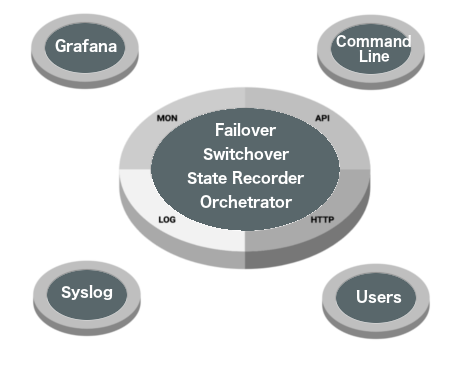
replication-manager runs as a daemon that continuously monitors your clusters. It exposes a REST API, a web GUI, and accepts commands from the CLI client.
3.1.2 Start
systemd (package install):
systemctl start replication-managerEnable on boot:
systemctl enable replication-managerinit.d (legacy):
/etc/init.d/replication-manager startManual (tarball or embedded binary):
replication-manager monitor --config /etc/replication-manager/config.toml --http-server3.1.3 Stop
systemctl stop replication-manager3.1.4 Check Status
Service status:
systemctl status replication-managerCluster status via CLI:
replication-manager-cli statusAll clusters:
replication-manager-cli --cluster="mycluster" statusSample output:
| Group: mycluster |  Mode: Automatic
         Id            Host   Port    Status   Failures   Using GTID         Current GTID    Delay  RO
5641630519400684578  10.0.1.10  3306    Master          0    Slave_Pos     0-3306-4210            0 OFF
9624235790336213315  10.0.1.11  3306     Slave          0    Slave_Pos     0-3306-4210            0  ON
3944708846436490796  10.0.1.12  3306     Slave          0    Slave_Pos     0-3306-4210            0  ON
Cluster topology:
replication-manager-cli topologyWeb GUI:
Open https://<host>:10005 in a browser — the dashboard shows live cluster state, replication health, and server metrics.
3.1.5 Logs
See Logs for a full reference — log files written, per-module verbosity settings, rotation, and how to query logs via journalctl and the REST API.