Overview
4.7.1 Overview
Arbitration provides high availability for the monitoring layer by running two replication-manager instances across separate datacenters. An external arbitrator service ensures that exactly one instance is active at any time, preventing conflicting operations on your database clusters during network partitions. Arbitration requires a registered instance with a support or partner subscription plan.
Under the free plan, you typically deploy a single replication-manager instance in a third datacenter that acts as the arbitrator of your databases and proxies availability. Because such an instance does not hold critical data, it is easy to relocate in case of failure — you may lose monitored data and statistics, but you can restore configuration from personal backups or from the Signal18 GitLab for registered instances.
Both instances in the pair must share the same registration URI and the same encryption key. On the second instance, copy the following from the first:
- The encryption key file (path configured via
monitoring-key-path, default.replication-manager.key) cloud18-domaincloud18-sub-domaincloud18-sub-domain-zonecloud18-gitlab-usercloud18-gitlab-password
When arbitration is enabled, the first instance to start is elected active and the other enters standby mode. The active instance is the sole authority for all cluster operations. The standby instance monitors the same database clusters but does not modify them.
4.7.1.1 Architecture
When deploying across two datacenters, you can run two replication-manager instances in an active/standby pair. Both instances exchange heartbeats over HTTP via the replication-manager API, with an external arbitrator service resolving split-brain situations.
- Peer heartbeat — each replication-manager instance polls the other's
/api/heartbeatendpoint on the standard API port. This traffic stays on the local network or VPN. No authentication is required (the endpoint is unprotected). - Arbitrator — a lightweight external service (
replication-manager-arb) that both instances contact when a split brain is detected. The arbitrator decides which instance becomes active based on heartbeat reports. The arbitrator can be a shared public service behind a TLS reverse proxy.
Make sure the web server of replication-manager is active on both instances — the peer heartbeat uses the API port.
4.7.1.2 What is protected on standby
The standby instance suppresses all operations that could conflict with the active instance or cause unintended changes to the monitored databases.
Originally safeguarded (all versions with arbitration)
- Automatic failover — a standby instance never triggers automatic failover
- Slave rejoin — a standby instance never initiates crash recovery or GTID-based rejoin of failed servers
- Alert suppression — all alerts (email, Slack, webhook, scripts) are suppressed on standby to prevent duplicate notifications
Added in 3.1.30
- Maintenance operations — all scheduled database maintenance is suppressed on standby:
- Logical and physical backups
- Log rotation and log backups
- Rolling optimize, rolling restart, rolling reprovisioning
- Database analyze jobs
- SSH-based database jobs
- Table checksum monitoring
- Configuration push — the standby instance stops pushing configuration to the git repository and instead pulls configuration changes published by the active instance, reloading them automatically
Operations that remain active on standby
- Split-brain master protection — the standby demotes the old master as a writer and promotes it as a slave of the winner's elected master, preventing two writable servers (see 4.7.1.5)
- Database cluster monitoring (topology discovery, replication health, server state)
- SLA metric rotation (internal counters)
- Schema monitoring (read-only metadata collection)
- Alert schedule disable/enable (local toggle)
4.7.1.3 Standby config sync (3.1.30)
When arbitration is enabled, the active instance pushes cluster configuration to the git repository (git-url). Standby instances pull from the same repository and reload configuration changes automatically.
This ensures that configuration changes made on the active instance (enabling a backup schedule, changing a monitoring threshold, etc.) are propagated to the standby without manual intervention. If the standby is later promoted to active, it operates with the latest configuration.
The sync uses the existing git-url repository — no additional git configuration is required beyond what is already set up for configuration persistence.
4.7.1.4 Startup behavior
When the first instance starts, the peer is not yet reachable. This triggers split-brain detection and the instance contacts the arbitrator:
INFO Arbitrator: External check requested
INFO Arbitrator say winner
The arbitrator grants active status to the first instance.
When the second instance starts, it detects the peer is already active and enters standby mode:
INFO No peer split brain setting status to SIf the active instance goes down, the standby detects the peer is unreachable (split brain), contacts the arbitrator, and is elected as the new active instance.
Failover in a replication-manager cluster requires arbitration. If the arbitrator cannot be contacted, you can use the command line or API to failover manually — but make sure all other replication-manager instances are stopped first.
4.7.1.5 Split-brain master protection
The primary goal of arbitration is to protect the database infrastructure from having two masters accepting writes simultaneously. During a network partition, the active replication-manager may failover to a slave, promoting it as the new master. If the standby then takes over as active, it may still see the old master as writable — leaving two servers accepting writes and causing data divergence.
When the arbitrator elects a winner, the losing instance compares its own master with the winner's elected master. If they differ, the loser demotes its master by reattaching it as a slave of the winner's master using GTID-based replication (CHANGE MASTER). This converges the topology back to a single writer as quickly as possible.
If you need custom handling of the demoted master (for example, fencing it from client traffic before rejoining), you can use the arbitration-failed-master-script setting to run an external script instead of the automatic GTID rejoin. The script receives the failed master's host and port as arguments.
Note: Automatic master rejoin after lost arbitration only works with GTID-based replication.
4.7.1.6 Minority and majority: failover delegation and old-master protection
This mechanism is critical for continuity of service: it is what lets you safely enable automatic failover across two datacenters. Without it, a network partition would either block failover (an outage) or let both sides promote a master (split brain / data divergence). The minority/majority delegation keeps a single writer available and recoverable throughout the partition, so
failover-mode = automaticcan be trusted in a two-datacenter deployment.
Arbitration reasons per cluster in terms of a majority and a minority side of a network partition. The majority is the side that can still confirm authority through the arbitrator (the always-reachable third datacenter); the minority is the side that is cut off from both its peer and the arbitrator, and therefore cannot prove it holds authority.
The diagrams below trace the same three-datacenter partition through each plan — start from the free plan to see the problem the mechanism solves, then the support plan that removes it.
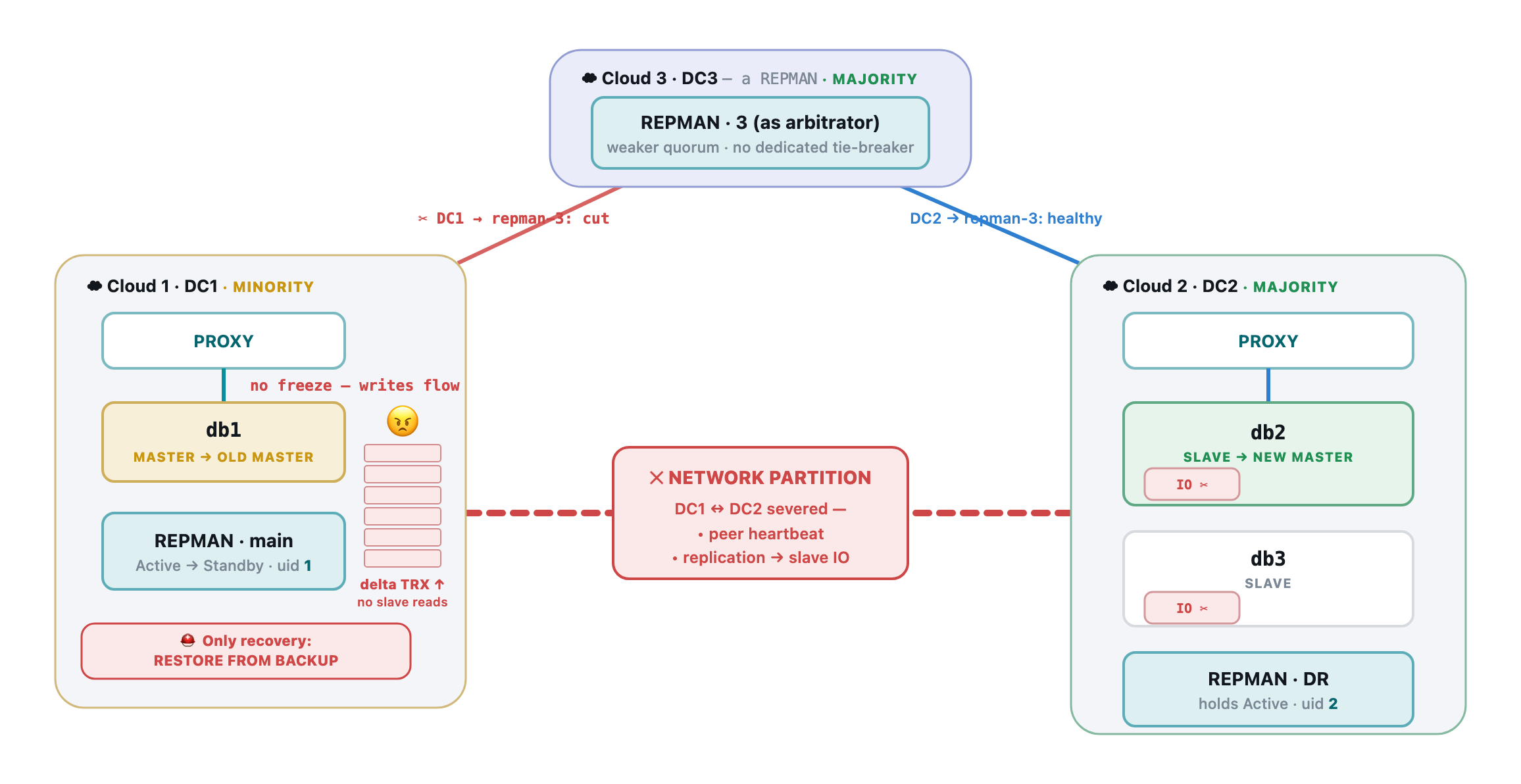 Free plan — no dedicated arbitrator (a third repman stands in), so tie-breaking is weaker and the split lingers. Replication is cut, so the isolated old master keeps writing binlogs no slave consumes: a growing pile of delta transactions that cannot be flashed back. The only way home is a full restore from backup.
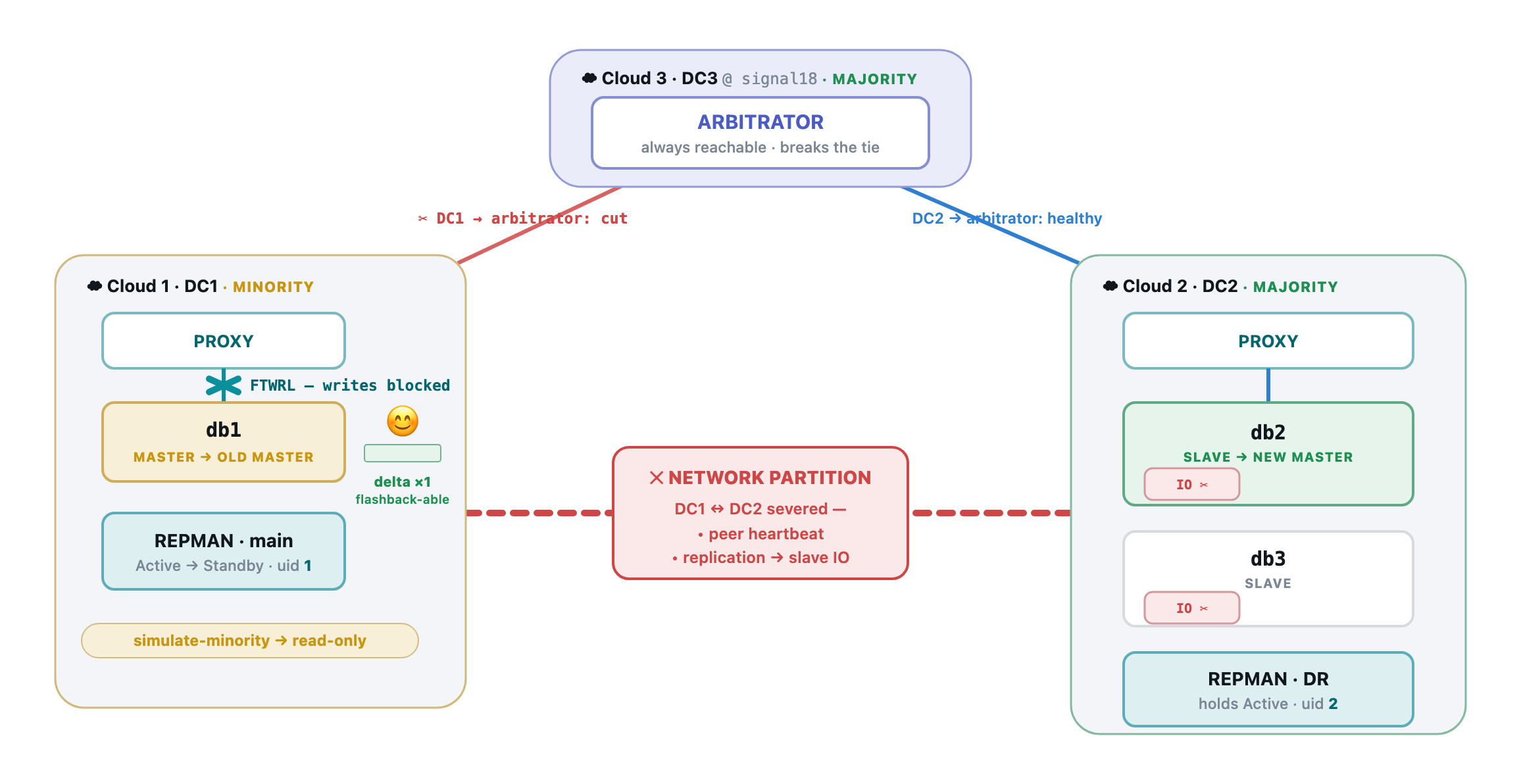 Support plan — a dedicated arbitrator in the third datacenter is the strong tie-breaker. The minority is detected fast and yields cleanly; its proxy-to-master link is FTWRL-fenced (writes blocked) while the majority promotes a new master. The old master's divergence is a single flashback-able delta — it rejoins in place in seconds, never a restore.
The minority delegates the failover to the majority
When the active replication-manager finds itself on the minority side and colocated with the current master, it must not fail over on its own: it cannot confirm it still holds authority, and promoting a replica alone would risk two writable masters. Instead it delegates the failover to the DR replication-manager on the majority side, which lives with one or more slaves. Because the majority can reach the arbitrator, it safely wins the election and elects a new master from its slaves.
Protecting the old master to avoid divergence during the split
To limit how far the isolated old master can diverge while the partition lasts, the minority does not simply abandon it — it fences it:
- sets it read-only and applies a FTWRL (
FLUSH TABLES WITH READ LOCK) freeze, so no new write — not even from replication-manager's own SUPER connection — can land on it; - marks it failed for the proxy running on the minority side, so that proxy stops routing client traffic to this now-dead master.
Together these keep the old master from accumulating a large divergent tail while the majority runs the real failover on the other side of the partition.
Known limitation: symmetric (equal) partitions
The mechanism above resolves a clear majority/minority split — one side keeps the arbitrator and the other loses both the arbitrator and the peer. A symmetric partition, where the two instances are cut from each other but both can still reach the arbitrator (equal partitions, neither a clear minority), is a known limitation: the arbitrator does not yet force both sides to stand down until the split resolves. This "both-sides-loser" arbitration and its test case are planned work. Deployments should keep the arbitrator in a third location whose link to each side fails independently, so a real partition produces a clear minority rather than an equal split.
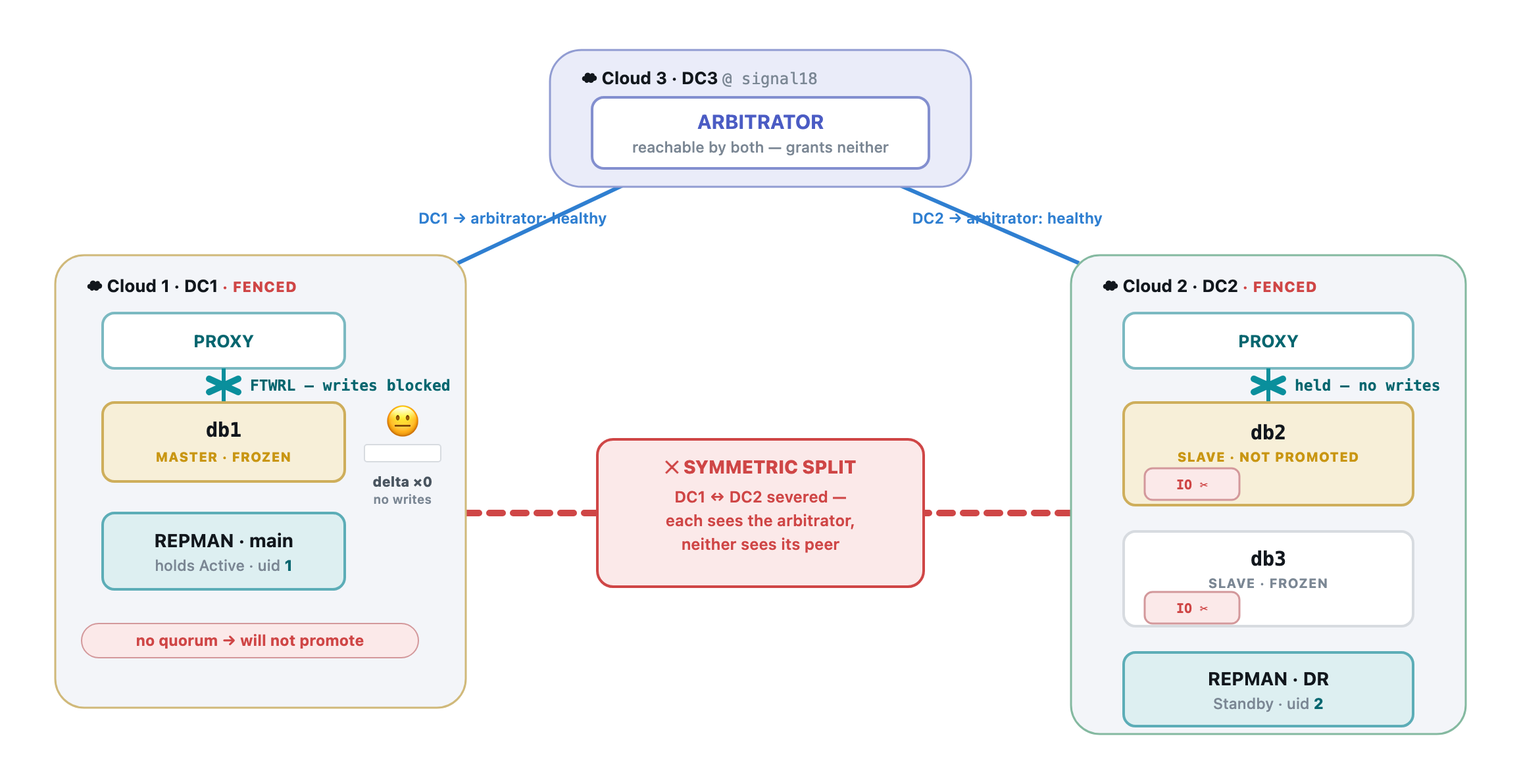 Symmetric split — both datacenters still reach the arbitrator but not each other, so each could naïvely read a 2-of-3 majority and promote. The safe resolution is to grant neither: both proxies are cut and both masters are FTWRL-frozen. The price is a full write outage until an operator (or a directional-failback policy) elects a survivor — but there is zero divergence, so recovery is a clean unfreeze, never a restore.
Regaining active status and rejoining the old master
Once the split brain ends, the minority instance regains its active replication-manager status. It then processes the rejoin of the old master, which may have diverged (writes that committed before the fence took effect). The old master is reattached under the newly elected master:
- cleanly, by GTID
CHANGE MASTER, when nothing diverged; - otherwise via flashback, reseed, or another operator-chosen recovery, guided by the captured lost events (the divergent tail), so the cluster converges back to a single writer without silently discarding data.
Default behavior and version support
By default, replication-manager does not re-enter the lost events into the cluster. The divergent tail produced on the old master by an automatic failover is captured and preserved (the lost events archive), but it is not automatically merged back into the newly elected master — the safe default avoids automatic, data-affecting reconciliation.
- Older versions: the divergent dataset is not reintroduced automatically; recovering it required manual, out-of-band handling.
- Since 3.1.32: the correction can be conducted manually from the dashboard — the Last Divergence viewer shows the captured divergent tail and offers the recovery methods (flashback, logical dump, logical/physical backup restore, reset-and-reslave, or discard-and-force). Each method is offered only when it is actually possible for that cluster.
- Automation of this correction is possible by enabling one or more of the automatic rejoin methods (
autorejoin-flashback,autorejoin-mysqldump,autorejoin-logical-backup,autorejoin-physical-backup, …). When an applicable method is enabled, replication-manager rejoins the diverged old master automatically instead of waiting for an operator.
Reviewing the divergent tail (crash history)
Rejoining the old master first produces a backup of the divergent binlog delta — the events the old master wrote past the failover election point — before any recovery is attempted. Each real crash is kept on disk with its captured delta and can be reviewed from the crash history list in the dashboard (the Last Divergence viewer), one entry per crash.
Since 3.1.32, the viewer shows the decoded diff of that delta (the exact statements and row events that diverged) and marks it flashback-able when possible — that is, when the tail is pure row-based DML that flashback can reverse. When it is not flashback-able (it contains DDL or statement-format writes), the viewer says so, so the operator knows a reseed or restore is required instead of a rewind.
A switchover also leaves a row in the crash history (it is a master change, and its election anchors serve point-in-time recovery), but it has no divergent tail by construction: the old master is frozen under a global read lock and the candidate has applied all its relay logs before promotion. Since 3.1.42 the switchover stamps its own row no-divergence once the old master is re-slaved, and the Crashes view shows none in the Divergence column with no Lost Events to review. Rows written by earlier releases keep an empty outcome.
4.7.1.7 Single replication-manager: self-arbitrated failover
When the network is trustable (a single datacenter, or a reliable LAN/VPN), a single replication-manager instance is a complete solution and follows exactly the same architectural design — it is simply the arbitrator of its own decisions, with no external third party to consult.
Its automatic failover rests on the same core assumption: the master crash must be real, not a transient network glitch. Before promoting a slave, replication-manager runs its false-positive detection and cross-checks the outage from two independent angles:
- the proxy view of the master (external reachability), and
- the slaves — if any slave can still communicate with the master (replication I/O still flowing, slave heartbeat still increasing), then the master is not actually down.
If any of these still sees the master, the outage is treated as a false positive and replication-manager does nothing — no failover — avoiding a needless promotion that would create two masters the moment the master recovers.
When the checks confirm a real outage, replication-manager acts — and the failover succeeds cleanly when the slaves run semi-synchronous replication (semisync). A semisync slave has acknowledged every transaction the master committed, so the elected slave has received all of the master's events and has not diverged; it can be promoted as the new master with no lost transactions. Without semisync, an asynchronous replica may lag behind at the moment of the crash, and whatever the old master committed but had not yet shipped becomes the divergent tail handled by the rejoin/lost-events flow described above.
4.7.1.8 Arbitrator availability and subscription requirements
Starting from the release following 3.1.30, the arbitrator binary (replication-manager-arb) will be included in all release editions, not only the Pro edition. This allows any deployment to set up active/standby pairs with external arbitration.
However, automatic split-brain resolution requires a registered instance with a support or partner subscription plan. Instances that are not registered to Cloud18 via a GitLab user, or that are on the free plan, will:
- Still participate in heartbeat exchange and initial active/standby election
- Display an
ERR00104error state when split-brain is detected - Not receive automatic arbitrator election to resolve the split-brain
This means the active/standby mechanism works for everyone, but automatic recovery from a network partition between the two instances is a supported-plan feature. Manual recovery via the API (ForceArbitratorElection) or the dashboard toggle remains available regardless of plan.