API Tokens
8.8 API tokens
Since 3.1.43 a user can issue API tokens for themselves: bearer credentials for
scripts, CI jobs, an MCP server or the CLI, that carry a subset of the user's own grants
and a cluster scope, and expire. A client sends the token as
Authorization: Bearer <token> and never logs in. Every call is attributed to the user
who issued the token in the security log.
A token replaces the interactive login for machine clients. The login itself, the
POST /api/login call that returns a session JWT from a username and password, and the
accounts it authenticates are described in First login and
API client usage. Creating a token still requires that login: a
token cannot issue tokens.
A token can only narrow what its owner may do, never extend it:
- At creation, every grant put in the token must be a grant the owner holds.
- At every request, the effective grants are the token's grants and the owner's current grants. Remove a grant from the user, and every token of that user loses it at once. Delete the user, and the tokens stop working.
- A token scoped to named clusters can only reach those clusters' endpoints. Global settings and cluster management need the "every cluster" scope.
- A token cannot issue tokens. Creating one requires an interactive login.
- Two grants control it:
token-createlets a user issue tokens for their own account,token-managelets them list and revoke other users' tokens on a cluster. Both are in the default ACL ofadmin;dba, sponsors and external dbops gettoken-create. If yourapi-credentials-acl-allowlists grants explicitly, addtokenortoken-createto the users who should issue tokens. Thesystemservice account can never hold these grants.
8.8.0 Enabling and disabling API tokens
Two independent settings decide whether a user can create a token. Both are needed:
| Level | Setting | Default | What it does |
|---|---|---|---|
| Server | api-user-tokens |
true |
Turns the feature on or off for the whole replication-manager. It gives no right to anyone. |
| User | the token-create grant, in api-credentials-acl-allow |
admin has token, dba has token-create |
Lets that user issue tokens for their own account. |
api-user-tokens = true alone is not enough: a user without the token-create grant
sees no API tokens button in the dashboard, and the API answers
403 No token-create grant.
The trap: an explicit api-credentials-acl-allow
The default api-credentials-acl-allow is
admin:cluster db proxy prov global grant show sale extrole terminal app token,dba:cluster proxy db token-create.
If your configuration sets api-credentials-acl-allow itself, that value replaces
the default completely. A list written before 3.1.43, or copied from the sample
config.toml, has no token: after the upgrade the feature is on, but nobody can use it.
Add token (or token-create) to the users who should issue tokens in the main
configuration, then restart replication-manager:
api-credentials-acl-allow = "admin:cluster db proxy prov global grant show sale extrole terminal app token,..."The main configuration always wins over cluster-level ACLs. To check a user, open the
User Profile (click the user name in the top bar): in Grants per cluster, the
token-create row must show a check mark on at least one cluster; a - everywhere means
the grant is missing.
Since 3.1.45, a cluster where api-user-tokens is on but no user holds token-create
shows the config state WARN0251 in its configuration findings: the explicit list is
kept as you wrote it, the state tells you to add token.
A line api-credentials-acl-discard-external = "admin:token,..." in a cluster file is not
the cause: replication-manager records there every grant a user did not hold at the
last save. It goes away once the grant is given.
Disabling API tokens
-
For the whole server: set
api-user-tokens = falsein the main configuration and restart replication-manager. Nobody can issue a token, and every existing token is refused at once (API tokens are disabled). The tokens are not deleted: set it back totrueand they work again until their expiry, unless revoked meanwhile. -
For one user: remove
token/token-createfrom that user's grants (inapi-credentials-acl-allow, or in the cluster's Users tab), or discard them:api-credentials-acl-discard = "alice:token"(since 3.1.45 a discard takes the compact nametokenlike the allow list; before, writetoken-create token-manage). They can no longer issue tokens, but the tokens they already issued keep working: revoke them from the API tokens panel of the cluster's Users tab (granttoken-manage) or withDELETE /api/tokens/{id}.Upgrading to 3.1.45: check your discard lists. Before 3.1.45 a discard (
api-credentials-acl-discard,api-credentials-acl-discard-external) only removed exact grant names: a compact name such asadmin:dborviewer:clusterremoved nothing. Since 3.1.45 a compact name removes every grant it starts (dbremoves everydb-*grant), as in the allow lists; a full name still removes that grant only. An old entry that did nothing now takes grants away: each such removal is written to the security log (discard "db" removes the grants [...]). Remove the entries you did not mean. -
One token: revoke it (dashboard trash icon,
replication-manager-cli token revoke <id>orDELETE /api/tokens/{id}). It is refused immediately.
Other requirements
- A persistent secret key. Tokens are signed and stored with the key file of
monitoring-key-path(default/etc/replication-manager/.replication-manager.key, created byreplication-manager keygen, see Security configuration). Without it the API answersAPI tokens are disabled (api-user-tokens) or no persistent secret key is set. - The server and the CLI must both be 3.1.43 or later (see the CLI note below).
8.8.1 Creating a token
A token is created by a user logged in with their username and password (dashboard, API login or CLI login), for themselves. The server and the client must both be 3.1.43 or later.
Dashboard
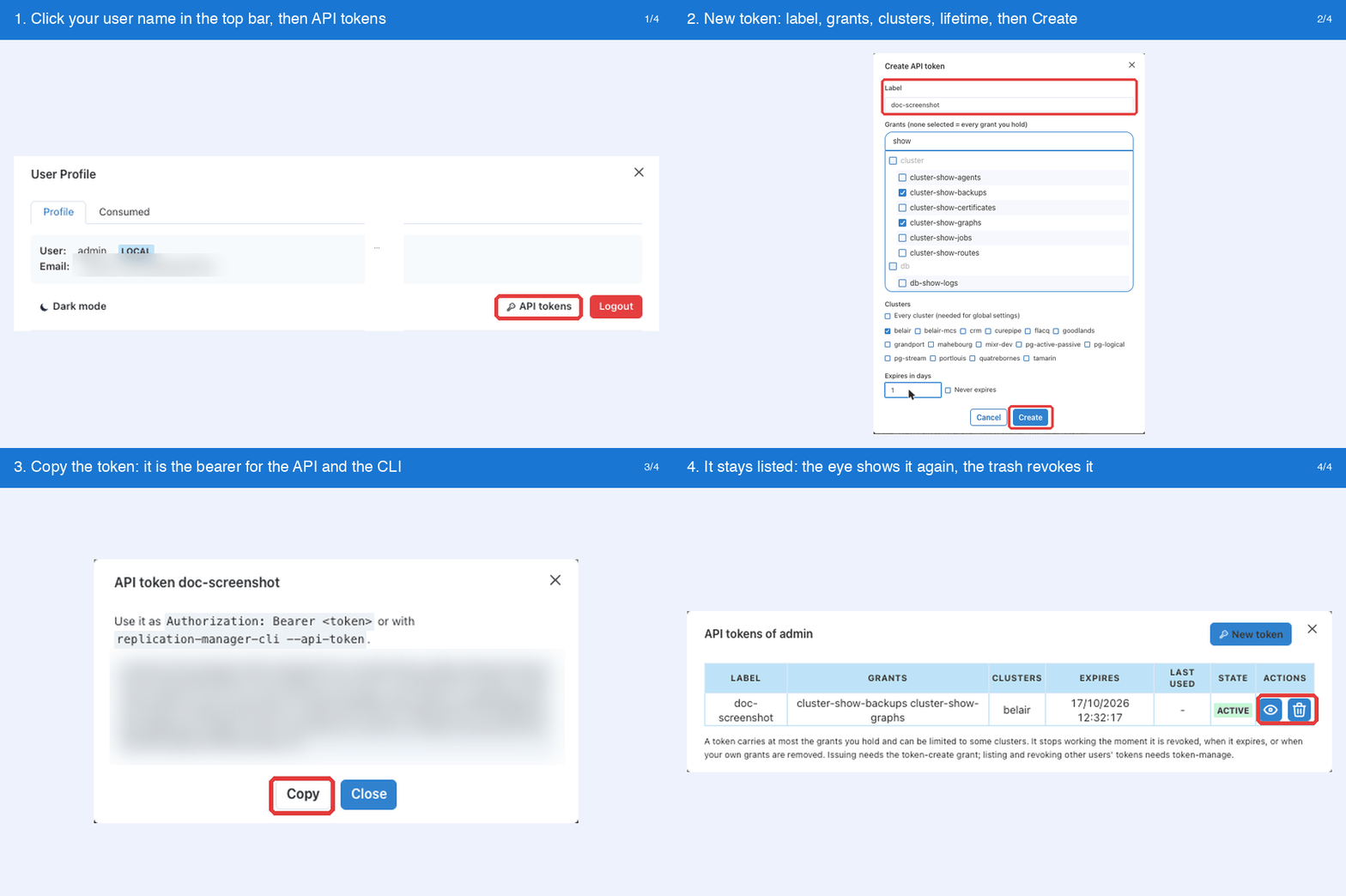
- Log in to the dashboard with your username and password.
- Click your user name in the top bar: the User Profile window opens.
- Click API tokens. The button only shows when you hold the
token-creategrant on at least one cluster; without it, ask an administrator for the grant (see above). - Click New token, then fill the Create API token form:
- Label: a name to recognize the token (
ci,mcp,laptop…), required. - Grants: tick the grants to put in the token; none ticked means every grant you hold.
- Clusters: Every cluster (needed for global settings), or tick the clusters the token may reach.
- Expires in days, or Never expires.
- Label: a name to recognize the token (
- Click Create. The token is displayed with a Copy button: copy it now. It stays listed in the API tokens window, where the eye icon shows it again and the trash icon revokes it.
API
Log in with your username and password to get a session JWT, then post the token request
with that JWT as the bearer. The response is the token record; its token field is the
API token:
REPMAN=https://repman:10005
JWT=$(curl -s -k -X POST -H 'Content-Type: application/json' \
  --data '{"username":"admin","password":"..."}' $REPMAN/api/login | jq -r .token)

APITOKEN=$(curl -s -k -X POST -H "Authorization: Bearer $JWT" -H 'Content-Type: application/json' \
  --data '{"label":"ci","grants":"db-show proxy","clusters":["belair"],"expireDays":30}' \
  $REPMAN/api/tokens | jq -r .token)

curl -k -H "Authorization: Bearer $APITOKEN" $REPMAN/api/clusters/belair/topology/servers
The request body:
| Field | Type | Description |
|---|---|---|
label |
string | Name of the token, required. |
grants |
string | Grant prefixes separated by spaces as in the ACL configuration ("db-show proxy"); "" means every grant you hold. |
clusters |
list of strings | Cluster scope (["belair","flacq"]); [] or ["*"] means every cluster you can see. |
expireDays |
integer | Lifetime in days; 0 means the server default (api-user-tokens-default-expire-days), -1 never expires. |
A 403 answer gives the reason: No token-create grant, An API token cannot issue tokens, log in with your credentials (the bearer was an API token, not a login JWT), or
API tokens are disabled (api-user-tokens=false). A 400 names a grant you do not hold
or an unknown cluster.
The other calls:
| Method | Path | Purpose |
|---|---|---|
POST |
/api/tokens |
create, body above |
GET |
/api/tokens |
list my tokens |
DELETE |
/api/tokens/{id} |
revoke |
GET |
/api/clusters/{name}/tokens |
list every token covering a cluster (grant token-manage) |
CLI
replication-manager-cli token create --label ci --grants "db-show proxy" --clusters belair --expire-days 30
replication-manager-cli token list
replication-manager-cli token revoke <id>
token create logs in with --user and --password like any other command.
--grants takes grant prefixes as in the ACL configuration (db-show, proxy,
cluster-switchover, …); --expire-days -1 means no expiry; both default to "everything
I hold" and the server default lifetime.
The token command and the --api-token flag exist since the 3.1.43 CLI. The CLI is
its own package, replication-manager-client, and up to 3.1.44 upgrading the server
package does not upgrade it: check replication-manager-cli version and upgrade it
explicitly (apt-get install replication-manager-client or
dnf upgrade replication-manager-client). An older CLI answers unknown command "token"
or unknown flag: --api-token.
8.8.2 Using a token
With the interactive login you first exchange a username and password for a session JWT (see API client usage):
JWT=$(curl -s -k -H 'Content-Type: application/json' --data '{"username":"admin","password":"..."}' https://repman:10005/api/login | jq -r .token)
curl -k -H "Authorization: Bearer $JWT" https://repman:10005/api/clusters/belair/topology/servers
With an API token there is no login call, the token is the bearer:
curl -k -H "Authorization: Bearer <token>" https://repman:10005/api/clusters/belair/topology/servers
replication-manager-cli --api-token <token> topology --cluster belair
A session JWT expires after api-token-timeout hours and dies when replication-manager
restarts; an API token lives until its expiry or revocation and survives restarts.
A revoked token is refused immediately. Revoking another user's token needs the
token-manage grant on every cluster the token covers.
Dashboard, every user's tokens on a cluster (since 3.1.44): with token-manage on a
cluster, its Users tab shows an API tokens panel listing every token that covers the
cluster, whoever owns it: owner, label, clusters, grants, creation, last use (time and
address) and expiry, in two tabs. Active lists the tokens in use: the trash icon revokes
one after a confirmation naming its owner and label. Archive lists the revoked tokens (when
and by whom) and the expired ones, kept 90 days as the audit trail. The token string itself is
never shown there. When the token also covers a cluster where you lack
token-manage, the revoke is refused and the error names that cluster. The Users tab opens
with cluster-grant or token-manage; each panel needs its own grant.
8.8.3 Where tokens live
Tokens are stored on the replication-manager instance in
<monitoring-datadir>/api-tokens.json, encrypted with the persistent secret key
(monitoring-key-path) and excluded from the configuration git sync. They survive a
restart of replication-manager. Rotating the secret key invalidates every token: reissue
them afterwards.
8.8.4 Settings
| Setting | Default | Description |
|---|---|---|
api-user-tokens |
true |
Server switch of the feature. false refuses both issuing and authenticating with a token. It grants nothing: a user also needs the token-create grant (see 8.8.0). |
api-user-tokens-default-expire-days |
120 |
Lifetime of a token when none is given. 0 means no expiry. |
Both are server-wide settings of the main configuration file; a change needs a restart.
8.8.5 Security log
Events api_token_created, api_token_revoked and api_token_denied (a token used out of
its scope or for a grant it does not carry) are written to the security log with the
owner's name and the client address. See Security logging.